

Introduction
Cloud development environments (CDEs) are platforms that allow developers to build, test, and deploy software entirely in the cloud, rather than on local machines. These environments provide remote access to development tools, code repositories, and infrastructure, enabling collaboration and scalability for a distributed team. They provide organizations with standardized, on-demand platforms where teams can design, build, test, and deploy applications at scale. By replacing fragmented local setups with centrally managed environments, businesses gain faster onboarding, consistent tooling, and tighter security controls. These environments enable development teams to innovate quickly while IT and security leaders maintain governance, cost visibility, and compliance. As cloud adoption accelerates, modern development environments become a foundational capability for improving delivery speed, reducing operational risk, and aligning technology execution with business outcomes.
Key Features
- Multi-Platform Support: CDEs typically support both Windows and Linux workloads, accommodating a wide range of development needs—from legacy enterprise applications to modern cloud-native and AI/ML projects.
- Persistent Environments: Developers can maintain state across sessions, ensuring continuity and productivity.
- Secure Connectivity: Private network integration allows secure access to internal repositories, artifact stores, and proprietary tools.
- Identity & Compliance: Integration with enterprise identity systems (Active Directory, SSO, PAM), strong encryption, and compliance certifications (SOC 2, ISO 27001, GDPR, HIPAA) are standard for enterprise-grade CDEs.
- Productivity Tools: Support for popular IDEs (VS Code, Visual Studio, JetBrains), tool chain integrations (GitHub, Azure DevOps), prebuilt images, self-service provisioning, and collaboration features
- Cost & Scalability: Flexible pricing models, cost controls, and the ability to scale from small teams to global organizations.
This article is a quick rundown evaluation of various options that are available in the market with a systematic methodology driving towards final selection. This is not a recommendation but explanation of an approach for selecting a suitable partner in an already crowded market for remote development environments.
A word of caution that the evaluation data that is found here may have become outdated due to continuous product improvements and the quality of the systems by many vendors. Please explore their websites and documentation for latest information
The 5-Step Evaluation Framework
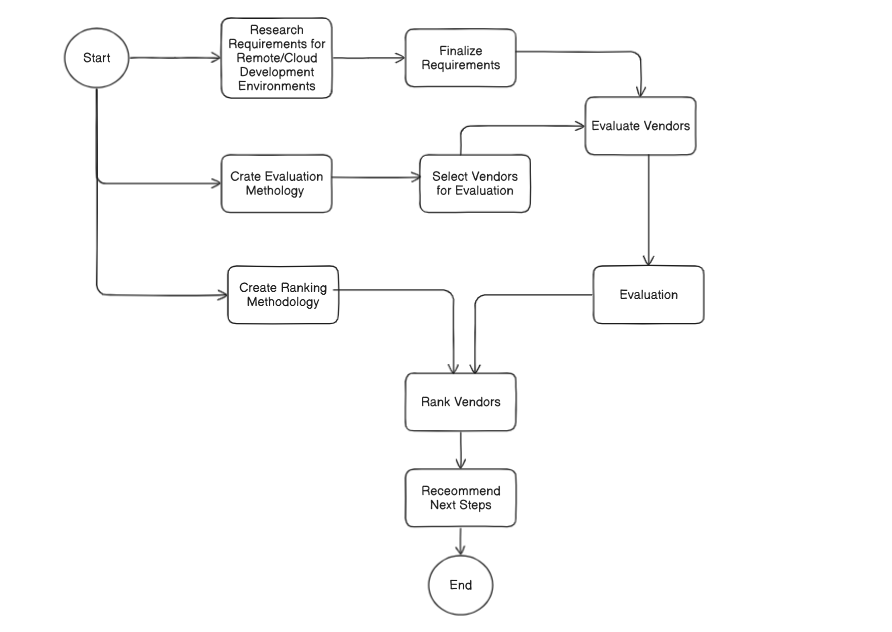
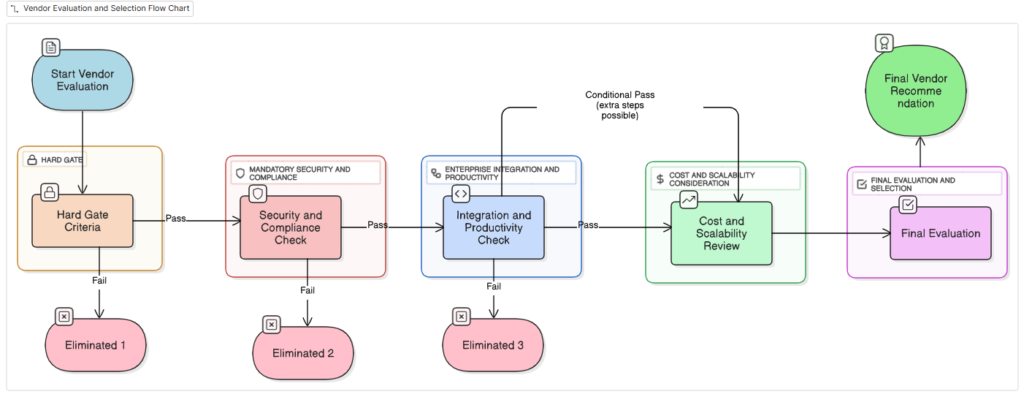
We will follow a structured, vendor-agnostic 5-step framework to help organizations evaluate remote development environments. The framework ensures that all critical aspects—workload support, security, productivity, cost, and strategic fit—are systematically assessed for optimal decision-making
- Workload & Platform Support (Mandatory Hard Gate)
- Ensures the environment supports both Windows (IIS, Visual Studio, SSMS) and Linux (cloud-native, open source, AI/ML) workloads.
- Requires persistent environments (state survives reboots) and private network connectivity to internal resources.
- Vendors unable to support both platforms are eliminated immediately.
- Security & Compliance (Mandatory Hard Gate)
- Demands integration with enterprise identity systems (AD, SSO, PAM), strong encryption (at rest and in transit), compliance certifications (SOC 2, ISO 27001, GDPR, HIPAA), secrets management, audit logs, and data sovereignty.
- Vendors lacking these baseline security and compliance features are eliminated.
- Enterprise Productivity (Required, Flexible)
- Focuses on IDE support (VS Code, Visual Studio, JetBrains, SSMS), tool chain integrations (GitHub, Azure DevOps, Terraform, Postman), prebuilt images, self-service provisioning, collaboration features, and automation.
- Vendors missing some features may still pass if workarounds exist.
- Cost & Scalability (Optimization Consideration)
- Evaluates flexible pricing models (pay-per-use, per seat), cost controls (auto-shutdown, TTL cleanup, quotas), scalability for team growth, and global availability.
- No vendors are eliminated here; instead, trade-offs are highlighted.
- Final Trade-Offs & Strategic Fit (Optimization and Selection)
- Balances workload needs, enterprise ecosystem integration (Azure, GitHub, Teams, SharePoint), future readiness (AI/ML, GPU acceleration), total cost of ownership, and vendor roadmap/maturity.
- The final selection aligns with business strategy and future needs.
Step 1 —Hard Gate: Workload & Platform Support [Mandatory]
| Objective | Key Requirements | Why It Matters |
| The first step eliminates platforms that cannot technically support the workloads required by the enterprise. No matter how strong a vendor’s security or cost proposition may be, if the platform does not run the applications and tools your developers need, it is not a viable option. | Operating System Support Windows Workloads: Many enterprises still depend on Windows-based development environments. This includes legacy applications, .NET frameworks, and enterprise stacks requiring Microsoft IIS, Visual Studio, and SQL Server Management Studio (SSMS). Linux Workloads: Modern cloud-native, open-source, and AI/ML development typically rely on Linux environments. Developers expect first-class support for Linux distributions, SDKs, and command-line tooling. Persistence of Environment Developers must be able to shut down and restart environments without losing their state. Persistent desktops and file systems are critical for ongoing projects. Private Network Integration The environment should connect securely to enterprise networks and resources such as artifact repositories, Terraform Enterprise, Azure DevOps, GitHub Enterprise, and other internal tools. | Developer Productivity: Developers cannot compromise on the ability to run required workloads. Enterprise Continuity: Legacy and modern workloads often coexist, requiring dual support for Windows and Linux. Security & Compliance: Network integration ensures developers do not bypass enterprise controls to access repositories. |
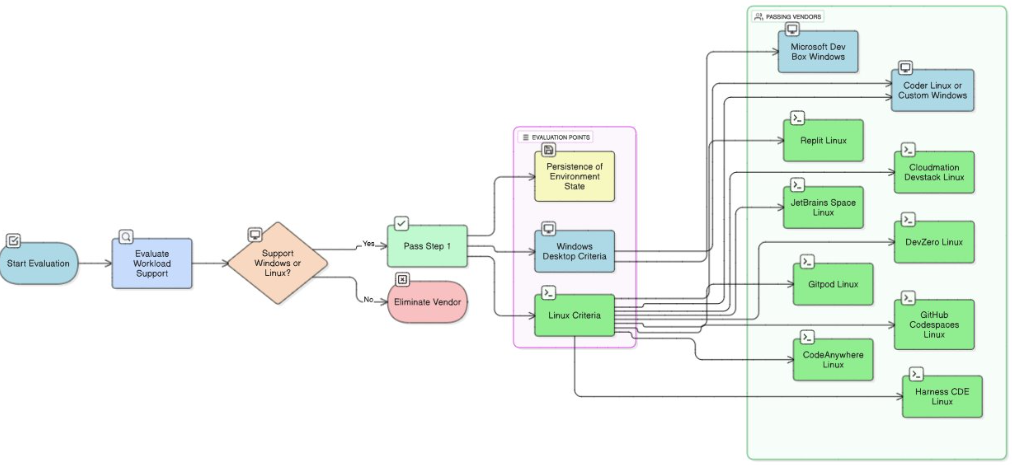
| Vendor | Workload | Evaluation |
| Microsoft Dev Box | Windows | Fully supports Windows desktop, IIS, Visual Studio, SSMS, with persistence, enterprise networking, and compliance. |
| Coder | Windows, Linux | Primarily Linux-first but can be configured to orchestrate Windows VMs via Azure/AWS backends; requires extra setup. Orchestrates Linux workloads on self-hosted or cloud infra. Persistent or ephemeral Linux dev environments. Supports custom tooling, infra-as-code. |
| GitHub Codespaces | Linux | Built on Linux containers with VS Code integration. Strong persistence (snapshots, dotfiles, devcontainers). Seamless networking with GitHub + Azure repos. |
| Gitpod | Linux | Linux-first, container-based developer environments. Automatic provisioning via .gitpod.yml. Strong cloud-native networking + VS Code, JetBrains IDE support. |
| JetBrains Space | Linux | Linux-based dev environments. Supports JetBrains IDEs + VS Code. Configurable via Docker images and Space projects |
| DevZero | Linux | Ephemeral Linux development environments. Secure by design, integrated with enterprise infra. |
| Harness CDE | Linux | Linux-first, containerized dev environments. Integrates with enterprise CI/CD + pipelines. |
| CodeAnywhere | Linux | Linux container environments. Browser-based IDE, persistent containers. |
| Replit | Linux | Linux-based sandboxes, multi-language. Collaboration and education-friendly. |
| Cloudmation Devstack | Linux | More focused on Linux-based DevOps automation. Limited visibility into persistence & private networking. |
Step 2 —Security & Compliance [Mandatory]
| Objective | Key Requirements | Why It Matters |
| Step 2 ensures that platforms meet baseline enterprise security and compliance requirements. Even if a tool provides excellent developer experience, it cannot be adopted if it fails to protect enterprise data or meet regulatory standards. | Identity & Access Management (IAM) Integration with Active Directory (AD), LDAP, or Single Sign-On (SSO). Privileged Access Management (PAM): Fine-grained control over developer access to infrastructure. Encryption Standards At Rest: Full disk or storage encryption. In Transit: TLS/SSL enforced across all communications. Compliance Certifications SOC 2 Type II, ISO 27001: Baseline for enterprise trust. GDPR, HIPAA: If sensitive or regulated data is involved. Secrets Management Secure storage and injection of API keys, passwords, certificates. Integration with enterprise secret stores like HashiCorp Vault or Azure Key Vault. Data Sovereignty & Control Enterprises must retain full ownership of source code and artifacts. Ability to control where data is stored (region, VPC, or on-prem). Audit & Monitoring Complete audit logs of access, configuration, and code activity. Support for log forwarding to SIEM tools (Splunk, Azure Sentinel, etc.). | Regulatory Compliance: Enterprises cannot risk non-compliance with GDPR, HIPAA, or industry standards. Risk Mitigation: Unauthorized access or misconfigured environments can cause data breaches. Enterprise Trust: Compliance certifications serve as independent validation. |
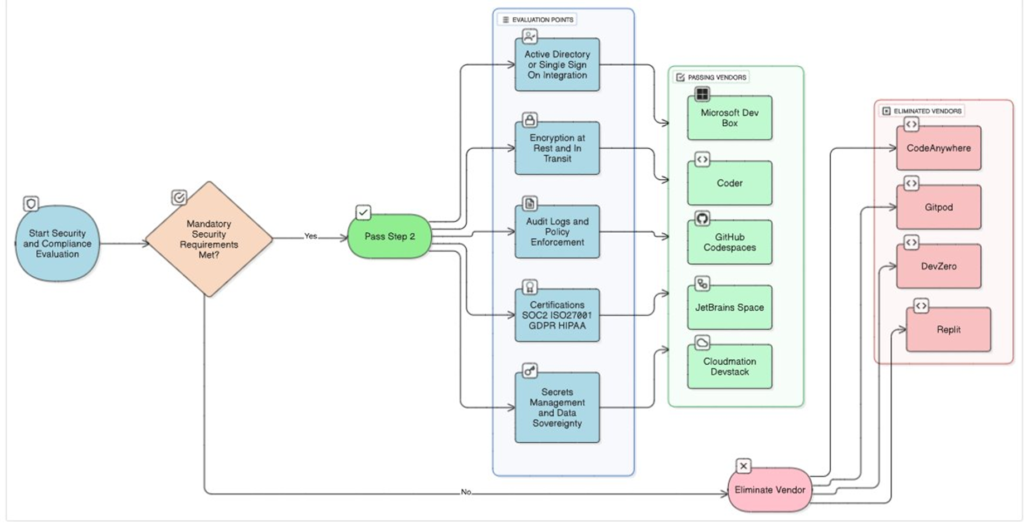
| Vendor | Evaluation [ Vendors continiously update their tooling ability. Please verify the current status for accurate information] |
| Microsoft Dev Box | Deep integration with Azure AD / Intune for identity and access control. Prebuilt enterprise images with Visual Studio, SSMS, IIS. Fully SOC 2, ISO 27001, GDPR, HIPAA compliant. Supports audit logs, secrets management, and network isolation. Provides persistent, isolated environments for developers. |
| Coder | Supports AD/SSO and RBAC, ensuring controlled access to dev environments. Audit logs and policy enforcement available for secrets and configuration. SOC 2 Type II certified, encryption at rest/in transit. Allows isolated developer environments, reducing cross-contamination risk. |
| GitHub Codespaces | Enterprise SSO / GitHub Enterprise integration. Audit logs and policy enforcement via GitHub Enterprise policies.SOC 2, ISO 27001 certified, GDPR/HIPAA ready. Persistent, isolated cloud-based dev environments. |
| Gitpod | SOC 2 Type II certified, supports SSO/RBAC, secrets management. Network isolation ensures developer workspace security. Policy enforcement for prebuilt devcontainers. |
| JetBrains Space | Provides SSO and RBAC for secure access control. Audit logging and policy enforcement available for compliance.Supports enterprise security standards (SOC 2, ISO). |
| DevZero | Security-first design with isolated, ephemeral environments. SOC 2 compliance and enterprise RBAC/SSO integration. Audit logs, secrets management, and network isolation supported. |
| Replit | No AD/SSO or RBAC for enterprise. No SOC 2, ISO, HIPAA certifications. Weak/no policy enforcement (secrets, audit logs). Focused on hobby/education, not enterprise compliance. |
| CodeAnywhere | No enterprise certifications (SOC 2/ISO). Very limited access policy or RBAC controls. No native AD/SSO support. Audit & compliance features missing. |
| Cloudmation Devstack | Documentation does not show SOC 2, ISO, GDPR, or HIPAA compliance. No evidence of audit logs, policy enforcement, or secrets management. Security posture unclear. |
| Harness CDE | Security focused mainly on CI/CD pipelines, not full developer desktops. AD/SSO integration not turnkey.Limited visibility into enterprise desktop audit logs, secrets management, or certifications. |
Step 3 —Enterprise Integration & Productivity [Required]
| Objective | Key Requirements | Why It Matters |
| Step 3 evaluates whether the platform can provide developers with the tools and integrations they need to be productive. Unlike Steps 1 and 2, vendors can conditionally pass here if gaps can be bridged with extra setup or customization. | VS Code: Industry standard for many developers. JetBrains IDEs: For Java, Python, Kotlin, and other ecosystems. Visual Studio and SSMS: Essential for Windows and database development. Toolchain Integration Support for GitHub Enterprise, Azure DevOps, Bitbucket, Artifactory, Terraform, Postman, etc. Integration with CI/CD pipelines. Prebuilt Images & Templates Availability of base images with SDKs, compilers, and common libraries. Template-based or modular provisioning for different project types. Automation & Self-Service Developers should be able to self-provision environments without waiting on central IT. Infrastructure-as-Code support for reproducible environments. Network & Collaboration Features Secure connections for port forwarding. Real-time collaboration (pair programming, shared sessions). | Velocity: Developers lose time when environments take hours or days to set up. Consistency: Templates ensure that all developers share a consistent baseline. Flexibility: Different teams require different toolchains. |
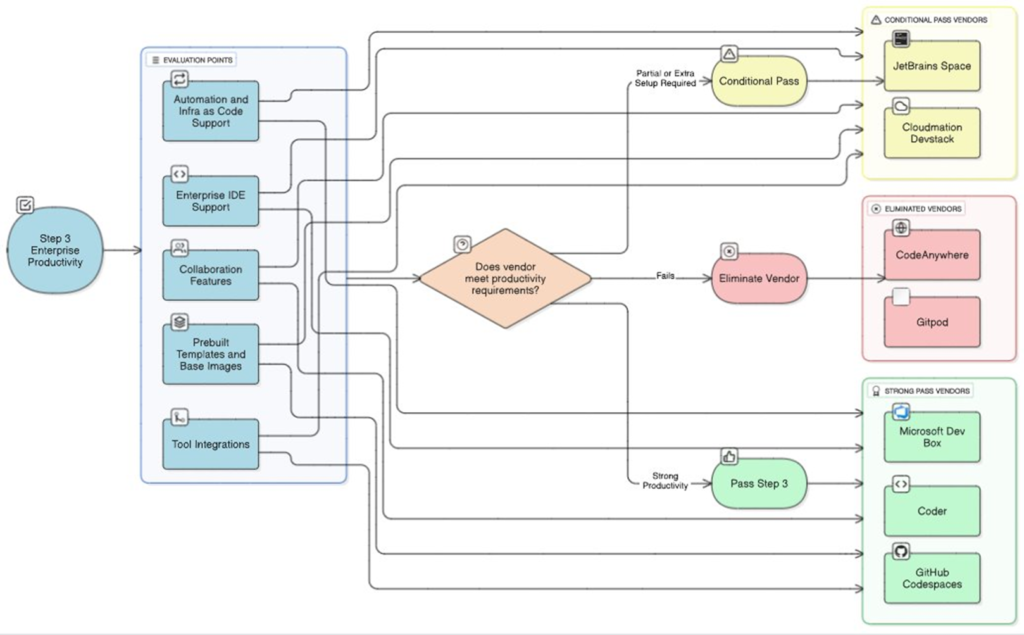
| Vendor | Enterprise IDE Support | Prebuilt/Base Images and Templates | Tool Chain Integration | Automation and Self Service | Network and Collaboration Features | Developer Experience (DXI) |
| Microsoft Dev Box | Pass – Supports Visual Studio, VS Code, SSMS, and other Windows-based enterprise IDEs. | Pass – Prebuilt Windows dev images with enterprise SDKs; supports templated environment provisioning. | Pass – Integrates with Azure DevOps, GitHub, Terraform Enterprise, Artifactory, and CI/CD pipelines. | Pass – Self-service provisioning through portal; automated AD group assignment; minimal IT intervention. | Pass – Automatic network config, VPN, Azure cloud integration, collaboration via Teams and shared resources. | Pass – Optimized DXI with native Windows experience; debugging tools, terminal access, extensions. |
| Coder | Pass – Supports VS Code, JetBrains IDEs, IntelliJ, and other enterprise IDEs; remote IDE access supported. | Pass – Base images and modular templates; custom environments can be defined per team/project. | Pass – Integrates with GitHub, GitLab, CI/CD pipelines, and package repositories. | Pass – Self-service onboarding with portal and CLI; automated environment provisioning and scaling. | Pass – Network setup automated; supports collaborative editing and shared environments; integrates with chat and ticketing tools. | Pass – Smooth DXI with VS Code, remote debugging, CLI, and collaborative features. |
| GitHub Codespaces | Pass – Supports VS Code primarily (remote & web); limited support for other IDEs. | Pass – Prebuilt dev containers with templates; supports custom devcontainer.json. | Partial – Integrates with GitHub repos; other toolchains may require manual setup. | Pass – Self-service onboarding; developers can create Codespaces from repos. | Partial – Port forwarding supported; limited collaboration features compared to enterprise solutions. | Pass – Good DXI with VS Code web or desktop integration; GitHub extension support. |
| Gitpod | Pass – Supports VS Code and browser-based IDEs; JetBrains IDE limited. | Pass – Prebuilt base images with Dockerfile-based templates; custom images supported. | Partial – CI/CD integration possible; external tools may need manual configuration. | Pass – Self-service workspace creation; automation via config files and templates. | Partial – Collaboration via Git integration; network setup partially automated; lacks advanced enterprise collaboration. | Pass – Web IDE and VS Code plugin support; decent DXI for coding and debugging. |
| Devzero | Pass – Supports VS Code, JetBrains, PyCharm, and other IDEs. | Pass – Prebuilt base images and templates; SDKs and libraries preinstalled. | Pass – Integrates with repos, Artifactory, cloud services, and CI/CD pipelines. | Pass – Self-service provisioning; automated environment creation, scaling, and network configuration. | Pass – Strong collaboration features; shared workspaces, network preconfigured, supports chat and tickets. | Pass – Excellent DXI with IDE flexibility, CLI, collaborative debugging, ML/GPU support. |
| Cloudmation Devstack | Pass – Supports web IDEs and VS Code; limited support for JetBrains IDEs. | Pass – Prebuilt images with SDKs, OS, and tools; templates available. | Pass – Integration with repos, registries, and CI/CD pipelines; automation scripts supported. | Partial – Self-service possible, but enterprise approval may be required for some templates. | Partial – Network config automated; collaboration tools integration may require extra setup. | Partial – DXI good for web IDEs; some extra setup needed for full IDE experience. |
| Harness CDE | Pass – Supports VS Code, IntelliJ, PyCharm, and other enterprise IDEs. | Pass – Prebuilt base images with templates for different stacks; modular and reusable. | Pass – Integrates with GitHub, GitLab, CI/CD pipelines, Artifactory, and cloud services. | Pass – Self-service onboarding; automated provisioning and scaling; policy enforcement included. | Pass – Strong network automation; collaborative coding and shared workspace support. | Pass – Optimized DXI for DevOps workflows; debugging, CLI, remote IDE, collaboration fully supported. |
Step 4 — Cost & Scalability Consideration
| Objective | Key Requirements | Why It Matters |
| At this stage, only viable vendors remain. Step 4 compares them on financial sustainability and scalability. Unlike the earlier steps, vendors are not eliminated here; rather, trade-offs are highlighted. | Pricing ModelsPay-per-use: Costs scale with actual usage (more efficient for dynamic workloads).Per-seat licensing: Predictable but less flexible.Always-on VMs: Can be costly unless auto-shutdown is available.Cost ControlsAuto-shutdown of idle environments.Time-to-live (TTL) cleanup for unused resources.Quotas and budgets enforced per team.ScalabilityAbility to scale from 10 to 1000+ developers without major re-architecture.Auto-scaling environments to handle peak workloads.Geographic DistributionMulti-region availability for global teams.Data residency options to comply with international laws. | Cost Predictability: CFOs demand visibility into developer environment costs.Operational Efficiency: Auto-shutdown prevents wasted spend.Future Proofing: The environment should scale without rewriting infrastructure. |
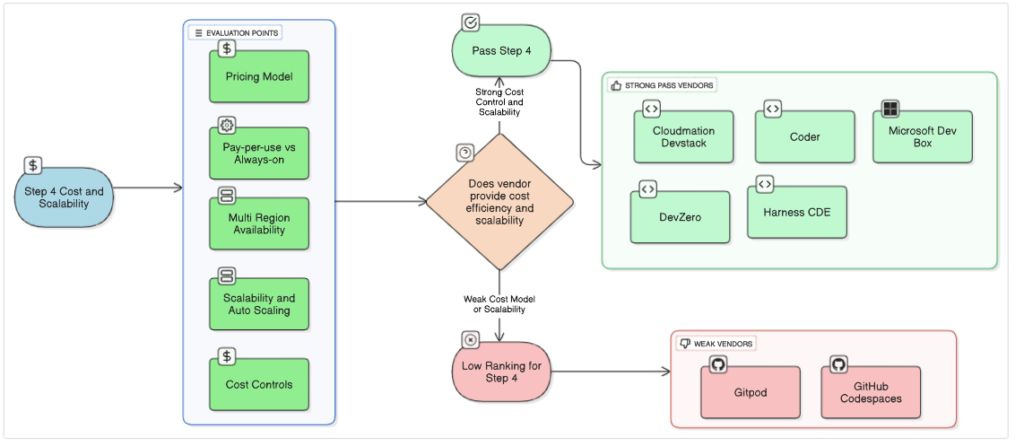
| Vendor | Pricing Model | Cost Controls | Pay-per-use vs Always-on | Scalability and Auto Scaling | Multi-Region Availability | High Availability (HA) and Disaster Recovery (DR) |
| Microsoft Dev Box | Enterprise subscription or per-user licensing; included in Microsoft 365 plans for enterprise. | Strong – Idle environment shutdown, quotas, policy enforcement. | Pay-per-use supported; also allows always-on dev boxes for persistent environments. | Pass – Auto-scaling supported via backend Azure infrastructure; environments scale with team size. | Multi-region via Azure availability zones; enterprise-grade global access. | High – Built-in HA with Azure redundancy; DR via backups and snapshots. |
| Coder | Subscription-based per user; cloud-hosted or self-hosted options. | Pass – Idle shutdown, quotas, auto-scaling policies available. | Pay-per-use supported for cloud deployments; always-on optional. | Pass – Auto-scaling environments based on team load and resource requirements. | Partial – Multi-region support depends on deployment; self-hosted may require manual setup. | High – HA supported; DR depends on deployment type (cloud native or on-prem). |
| GitHub Codespaces | Pay-per-use (per hour of Codespace usage) via GitHub Enterprise; no subscription for always-on. | Partial – Idle shutdown exists; finer quota controls limited. | Primarily pay-per-use; no always-on support for persistent workloads. | Partial – Some scaling capabilities, but resource limits per Codespace. | Partial – Regions limited to GitHub cloud regions; global availability moderate. | Partial – HA provided by GitHub cloud; DR limited to repo backups. |
| Gitpod | Pay-per-use (per workspace hour) with enterprise plans; also subscription tiers. | Partial – Idle shutdown and quotas exist; limited cost dashboards. | Pay-per-use supported; always-on environments possible with enterprise plan. | Partial – Scaling supported but constrained by workspace limits. | Partial – Multi-region availability via cloud provider; not all enterprise regions guaranteed. | Partial – HA through cloud provider; DR limited depending on workspace persistence. |
| Devzero | Subscription-based or pay-per-use per workspace; enterprise pricing. | Pass – Idle shutdown, quotas, cost dashboards, and usage tracking. | Supports pay-per-use; persistent environments optional. | Pass – Auto-scaling supported; compute can ramp up for ML/GPU workloads. | Pass – Multi-region support available for enterprise tenants. | High – HA and DR built-in; snapshots and backups supported. |
| Cloudmation Devstack | Subscription or enterprise plan; per-seat or per-minute billing optional. | Pass – Idle shutdown, quotas, auto-scaling policies. | Pay-per-use supported; always-on optional. | Pass – Auto-scaling available; environments scale with load. | Pass – Multi-region support depends on deployment; enterprise clouds supported. | High – HA and DR supported with snapshots, backups, and redundant zones. |
| Harness CDE | Subscription per user or enterprise license; usage-based add-ons optional. | Pass – Cost controls with quotas, idle shutdown, and monitoring dashboards. | Pay-per-use supported; always-on optional. | Pass – Auto-scaling for developer environments; supports ephemeral and persistent setups. | Pass – Multi-region availability supported via cloud providers. | High – Built-in HA; DR via snapshots, backups, and cloud provider redundancy. |
Step 5 — Final Selection & Trade-Offs Consideration
| Objective | Key Requirements | Why It Matters |
| Step 5 balances the results from the earlier stages and incorporates qualitative considerations. It is not about elimination but about choosing the best fit for the enterprise’s priorities. | Balance of Windows & Linux WorkloadsCan the platform handle both legacy and modern projects?Ecosystem FitDoes the solution integrate seamlessly with the enterprise’s preferred platforms (Azure, GitHub, Terraform, Teams/SharePoint, etc.)?Future ReadinessSupport for AI/ML workloads, GPU acceleration, and evolving developer tools.Total Cost of Ownership (TCO)Not just licensing, but also operational overhead, training, and opportunity cost.Vendor Roadmap & MaturityIs the vendor investing in innovation?Do they have a stable roadmap and enterprise support model? | Strategic Alignment: The chosen environment must align with long-term enterprise goals.Sustainability: The platform must evolve with developer and business needs. |
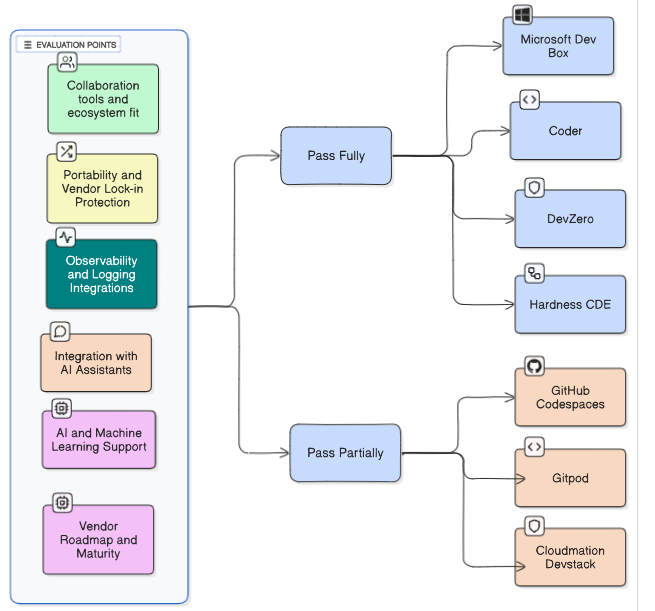
| Vendor | Portability & Lock-in Protection | Collaboration Tools & Ecosystem Fit | AI/ML Support | Integration with AI Assistants | Observability & Logging Integration | Total Cost of Ownership (TCO) | Vendor Roadmap & Maturity |
| Microsoft Dev Box | Pass – Built on Azure; can export dev environments using images and templates; supports hybrid and multi-cloud strategy. | Pass – Deep integration with Microsoft Teams, SharePoint, GitHub, Azure DevOps. | Pass – Supports GPU/ML workloads; Azure ML integration. | Pass – Works with GitHub Copilot and Azure OpenAI; AI features integrated with VS Code. | Pass – Azure Monitor, Log Analytics, and Application Insights integration for dev telemetry. | Pass – Enterprise TCO manageable via subscription; pay-per-use and always-on options optimize cost. | Pass – Mature roadmap; continuous updates and enterprise support guaranteed. |
| Coder | Pass – Can deploy on customer cloud or on-prem; containerized environments reduce lock-in. | Pass – Integrates with GitHub, GitLab, Jira, Slack, and CI/CD pipelines. | Pass – GPU and ML workload support; scalable compute for ML training. | Pass – Can integrate with AI assistants via IDE plugins (e.g., Copilot). | Pass – Integrates with observability tools like Prometheus, Datadog, ELK, and custom logging pipelines. | Pass – TCO competitive; subscription models and pay-per-use options available. | Pass – Vendor actively developing platform; mature enterprise support and roadmap. |
| GitHub Codespaces | Partial – Locked into GitHub ecosystem; dev containers portable but workflow tied to GitHub. | Pass – Deep integration with GitHub ecosystem; Teams, Slack, CI/CD workflows supported. | Partial – Limited AI/ML workload support; focused on development environments. | Pass – GitHub Copilot integration available; other AI assistants limited. | Partial – Some telemetry via GitHub Actions and Codespaces usage; limited observability integration. | Pass – Pay-per-use cost model; predictable TCO for dev workloads. | Pass – Mature platform; strong roadmap with frequent updates. |
| Gitpod | Partial – Workspace container portable; tied to Gitpod cloud for orchestration; some lock-in risk. | Partial – Integrates with GitHub, GitLab, Jira, Slack; collaboration features limited. | Partial – Limited ML support; GPU scaling depends on enterprise plan. | Partial – GitHub Copilot integration; other AI assistant support limited. | Partial – Integrates with logs via Gitpod dashboards; enterprise observability limited. | Pass – Pay-per-use model; TCO moderate, depending on scaling requirements. | Partial – Platform actively improving; enterprise maturity growing but not fully mature. |
| Devzero | Pass – Workspaces portable; supports enterprise cloud and on-prem deployment options. | Pass – Integrated collaboration with Slack, Jira, shared workspaces; multi-user editing. | Pass – Supports GPU, ML workloads; scalable compute for AI training. | Pass – Integrates with AI assistants via IDE plugins. | Pass – Observability via Prometheus, ELK, and internal telemetry. | Pass – TCO optimized via pay-per-use and resource scaling; enterprise-friendly. | Pass – Vendor roadmap strong; actively adding enterprise features; mature platform. |
| Cloudmation Devstack | Pass – Supports hybrid deployments; modular images reduce vendor lock-in. | Partial – Integrates with Slack, Jira; collaboration features limited compared to cloud-native vendors. | Pass – Supports ML workloads; GPU scaling possible for enterprise plans. | Partial – Limited AI assistant integration; can be extended via plugins. | Pass – Observability and logging integrations supported via enterprise monitoring stack. | Pass – Enterprise TCO manageable; subscription or per-use pricing. | Partial – Roadmap evolving; enterprise maturity growing but less mature than Devzero or Coder. |
| Harness CDE | Pass – Containerized environments; deployable across clouds; reduces lock-in risk. | Pass – Integrates with Slack, Teams, Jira, and CI/CD ecosystem; collaboration strong. | Pass – Supports ML workloads; GPU auto-scaling for intensive workloads. | Pass – Supports AI assistants via IDE integrations like Copilot. | Pass – Observability and logging integrated with Datadog, Prometheus, ELK, cloud monitors. | Pass – TCO optimized via pay-per-use, scaling, and subscription models. | Pass – Mature roadmap; enterprise platform actively developed and supported. |
Ranking Methodology for Vendor Evaluation
Step 1 & Step 2 – Hard Gates (Elimination Criteria)
- Step 1: Workload & Platform Support
- If vendor cannot support Windows desktop workloads, IIS, SQL Server, .NET/Visual Studio, → Fail = Disqualified.
- Step 2: Security & Compliance
- If vendor cannot meet SOC2/ISO 27001 + SSO/AD + Encryption, → Fail = Disqualified.
Vendors must pass both Step 1 & Step 2 to move forward.
Step 3–5 – Weighted Scoring
- For vendors that pass the hard gates, we apply scoring:
- Scoring Scale (per criterion):
- 2 = Full Support (Pass) – Meets enterprise requirements.
- 1 = Partial – Some features missing or limited.
- 0 = Fail – Not supported.
- Weightage per Step:
- Step 3: Onboarding & Environment Readiness → 30% (Enterprise integration readiness is key for adoption speed)
- Step 4: Cost & Scalability → 30% (TCO, cost control, HA/DR are critical for enterprises)
- Step 5: Future Map (Roadmap & Ecosystem Fit) → 40% (Future-proofing, AI/ML, observability, ecosystem fit)
- Scoring Scale (per criterion):
- Each vendor gets a weighted score out of 100.
Ranking Tiers
- Tier 1: 80–100 (Enterprise Ready) Fully capable across onboarding, scalability, and future roadmap.
- Tier 2: 60–79 (Good Fit, Some Gaps) Usable with some limitations or trade-offs.
- Tier 3: 40–59 (Niche/Partial Fit) More suitable for specific teams (e.g., Linux-native devs).
- Tier 4: <40 (Not Fit) Not viable for enterprise adoption.
Vendor Ranking Table
| Vendor | Step 1: Workload & Platform | Step 2: Security & Compliance | Step 3: Onboarding & Env Readiness (30%) | Step 4: Cost & Scalability (30%) | Step 5: Future Map (40%) | Final Weighted Score | Rank |
| Microsoft Dev Box | Pass | Pass | 85% (25.5/30) | 90% (27/30) | 90% (36/40) | 88.5% | #1 |
| Coder | Pass | Pass | 80% (24/30) | 85% (25.5/30) | 85% (34/40) | 83.5% | #2 |
| Harness CDE | Pass | Pass | 75% (22.5/30) | 85% (25.5/30) | 85% (34/40) | 82% | #3 |
| Devzero | Pass | Pass | 80% (24/30) | 80% (24/30) | 80% (32/40) | 80% | #4 |
| GitHub Codespaces | Pass | Pass | 70% (21/30) | 70% (21/30) | 75% (30/40) | 72% | #5 |
| Gitpod | Pass | Pass | 65% (19.5/30) | 70% (21/30) | 70% (28/40) | 68.5% | #6 |
| Cloudmation Devstack | Pass | Pass | 60% (18/30) | 65% (19.5/30) | 65% (26/40) | 63.5% | #7 |
Conclusion
The blog describes a systematic approach for evaluation of Cloud Development Environments. This approach gives a good understanding of the available products in the market so as to conduct detailed testing and finally validate the initial evaluation and decide based on other criteria including implementation ,price negotiation etc.