

Introduction
This blog discusses the design hierarchy framework that guides software development from the high-level strategy to concrete implementation decisions.
Effective software and system design is not a single step but a structured progression of interconnected concepts that guide how a solution is envisioned, shaped, and realized. It begins with Design Strategy, which sets the overall direction aligned to business and technical intent. From this foundation emerge Design Goals, defining what success looks like, and Design Constraints, establishing the non-negotiable boundaries within which the design must operate. Design Considerations capture the key trade-offs and forces that influence choices, while Design Principles provide consistent guidance for making those choices across the system.
As the design becomes more concrete, architects select Design Elements—the building blocks of the solution—and apply proven Design Patterns to address recurring problems efficiently and reliably. These culminate in explicit Design Decisions, which translate strategy and intent into actionable architecture and implementation choices. Together, these concepts create a coherent framework that helps teams design systems systematically, balance trade-offs, ensure alignment with goals and constraints, and deliver scalable, maintainable, and well-reasoned solutions.
Software Design Heirarchy
Let us briefly look at the concepts to refresh our understanding
| Defenition | Description | What is it? | Why is it Important? | Some Examples |
| Design Strategy | The overarching approach and philosophy for how the software will be designed to achieve business objectives. | Highest-level design concept Aligns technical decisions with business goals Defines the “big picture” approach Sets direction for all other design activities | Ensures technical decisions support business objectives Provides coherent direction for the team Helps prioritize competing concerns Influences technology choices and architecture | “Microservices-first strategy for scalability and team autonomy” “Mobile-first responsive design strategy” “API-first strategy for ecosystem integration” “Cloud-native strategy for flexibility and cost optimization” |
| Design Goals | Specific, measurable objectives the design must achieve, derived from the strategy. | Concrete targets that support the strategy Measurable and verifiable Balances multiple quality attributes Often expressed as “-ilities” (scalability, reliability, etc.) | Makes strategy concrete and measurable Provides success criteria Helps prioritize design tradeoffs Enables objective evaluation | “Support 10,000 concurrent users” “Achieve 99.9% uptime” “Enable deployment of new features within 2 hours” “Reduce page load time to under 2 seconds” “Support 5 new regions per quarter” |
| Design Considerations | Factors, concerns, and quality attributes that must be evaluated and balanced when making design decisions. | Things to think about when designing Often competing concerns that need balancing Context-specific factors Risk factors and constraints to consider | Ensures holistic thinking Prevents overlooking critical factors Helps navigate tradeoffs Documents reasoning behind decisions | Performance vs. maintainability Security vs. usability Cost vs. scalability Time-to-market vs. technical debt Consistency vs. availability (CAP theorem) Team expertise vs. ideal technology |
| Design Elements | The building blocks and components that make up the software system. | Concrete architectural components System structure and organization Technical building blocks What the system is made of | Defines system structure Enables modular development Supports separation of concerns Facilitates team organization | Services (in microservices) Layers (in layered architecture) Components and modules Databases, caches, message queues APIs, interfaces, contracts UI components, backend services |
| Design Principles | Fundamental guidelines and best practices that inform how elements should be structured and interact. | Universal or context-specific rules Guidelines for good design Proven best practices “How” to design well | Produces maintainable code Reduces complexity Enables testability Facilitates change | SOLID Principles: Single Responsibility Open/Closed Architectural Principles: Separation of Concerns Don’t Repeat Yourself (DRY) Distributed Systems Principles: Design for Failure Eventual Consistency |
| Design Patterns | Reusable, proven solutions to common design problems. | Template solutions Catalog of proven approaches Language for discussing design Specific implementations of principles | Proven solutions (reduced risk) Common vocabulary (better communication) Faster development (don’t reinvent wheel) Better maintainability (recognized patterns) | Creational Patterns: Singleton (one instance) Structural Patterns: Adapter (interface compatibility) Behavioral Patterns: Observer (event notification) Architectural Patterns: MVC (Model-View-Controller) |
| Design Decisions | Specific choices made about how to implement the system, considering all previous concepts. | Concrete choices with rationale Technology selections Architectural choices Implementation approaches Documented with reasoning | Makes implicit choices explicit Documents reasoning (for future reference) Enables review and discussion Helps onboard new team members Prevents revisiting settled questions | Use PostgreSQL instead of MongoDB for transactional data Implement authentication with JWT tokens, not sessions Use REST API instead of GraphQL for external integrations Deploy on AWS instead of Azure |
| Design Constraints | Limitations, requirements, and boundaries that restrict design choices. | Non-negotiable requirements Technical limitations Business constraints External factors Things you must work within | Defines boundaries for design space Prevents infeasible solutions Focuses effort on viable options Manages expectations Documents limitations | Technical Constraints: Legacy systems integration Business Constraints:Budget limitations Organizational Constraints:Team size and skills External Constraints:Third-party API limitations |
How do they exist in development context
| Concept | At What Level do they exist? | When are they applied? | What is the Output? | How Frequently do they change? |
| Design Strategy | Highest | First | Overall approach document | Rarely (major pivots only) |
| Design Goals | High | After strategy | Measurable objectives | Quarterly/yearly |
| Design Considerations | Medium | During design | List of trade-offs | Per major feature |
| Design Elements | Medium | During design | System components | Per feature/service |
| Design Principles | Medium | Before coding | Coding guidelines | Rarely (established early) |
| Design Patterns | Medium | During design | Pattern catalog | Per feature |
| Design Decisions | Low | Throughout | Decision records | Daily/weekly |
| Design Constraints | Any | Continuously | Constraint list | When requirements change |
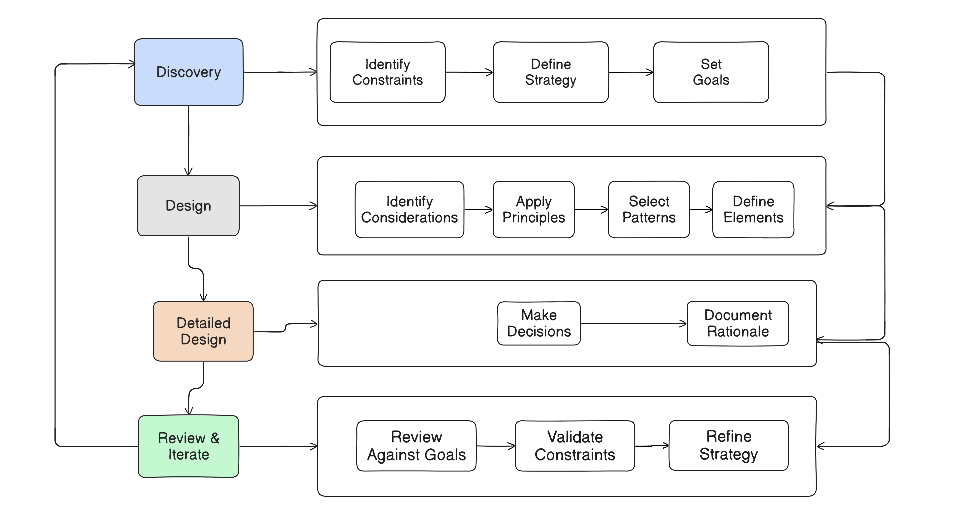
Are they always approached top down ? [ In practice, it’s not purely sequential – it’s iterative]
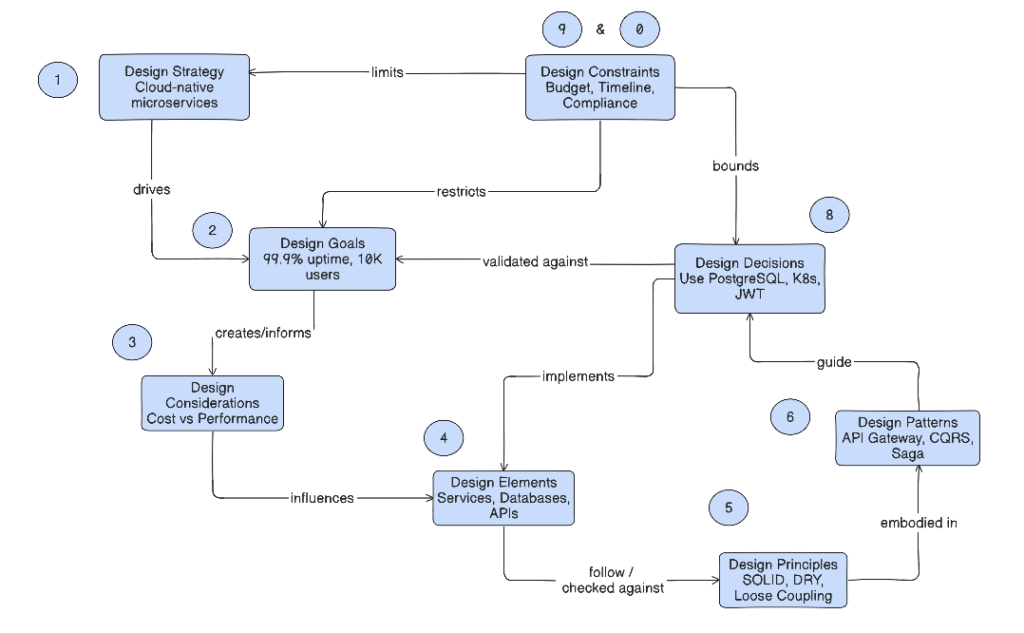
An Example
Design constraints are continuous – like they are both beginning and end and in between
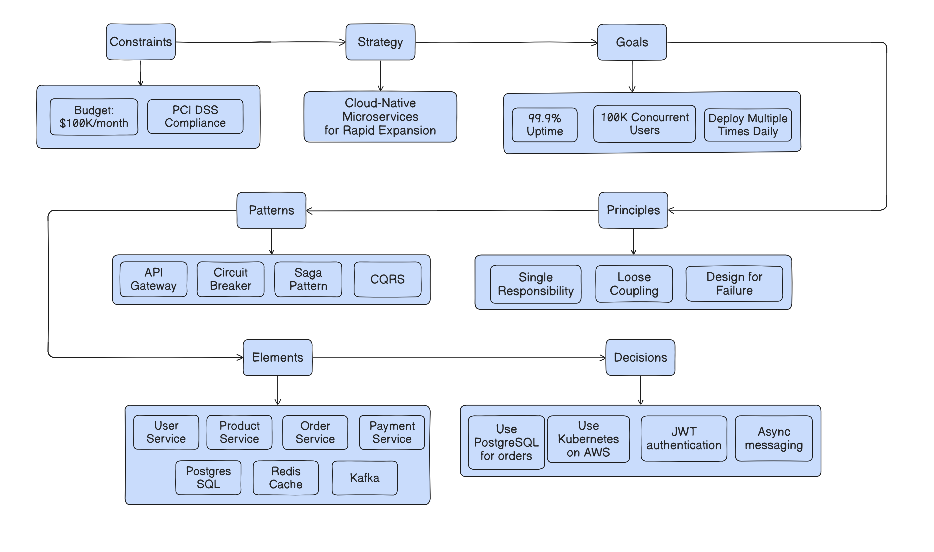
What is the most influential of all?
Design constraints are arguably the most important design concept because they define the boundary of what’s possible. They limit everything else, they limit the solution space, they prevent expensive failures and they shape innovation by often driving better solutions. Constraints can be many types like Technical Constraints (Infrastructure limitations, Technology mandates/ restrictions, Integration requirements, Performance requirements, Security requirements ), Business Constraints( Budget (capital and operational),Timeline and milestones,- Revenue/profitability targets, Competitive pressures ), Regulatory/Compliance Constraints (Industry regulations (HIPAA, PCI-DSS, GDPR), Company policies, Audit requirements, Data residency), Organizational Constraints( Team size and skills, Support capabilities, Change management capacity, Political realities) and External Constraints (Third-party dependencies, Vendor limitations, Customer requirements, Market conditions)
A Classification of Design Constraints and How to Navigate them
| Constraint | Constraint Type | Example | Strategy to deal with the constraints |
| HARD CONSTRAINTS | Non-Negotiable | – Laws and regulations – Physics and mathematics – Third-party platform limitations – Contractual obligations | Work within these. No exceptions. |
| FIRM CONSTRAINTS | Difficult to Change | – Budget (can increase with business case) – Timeline (can extend with justification) – Team size (can hire, but takes time) – Legacy systems (eventual replacement possible) | Challenge respectfully with data. |
| SOFT CONSTRAINTS | Preferences | – Technology preferences – Architectural styles – Team preferences – “Nice to have” features | Strategy: Negotiate and find alternatives. |
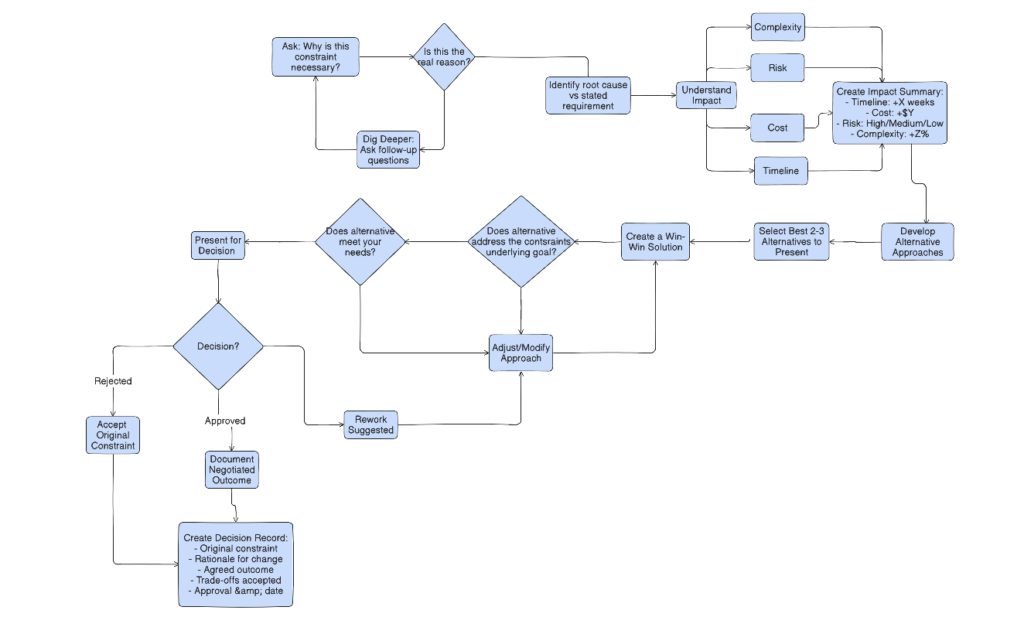
| PERCEIVED CONSTRAINTS | Not Real | – Assumptions never validated – Outdated policies – Misunderstandings | Question and validate. |
Following flow chart suggests a way of navigating the constraints if we need to change them
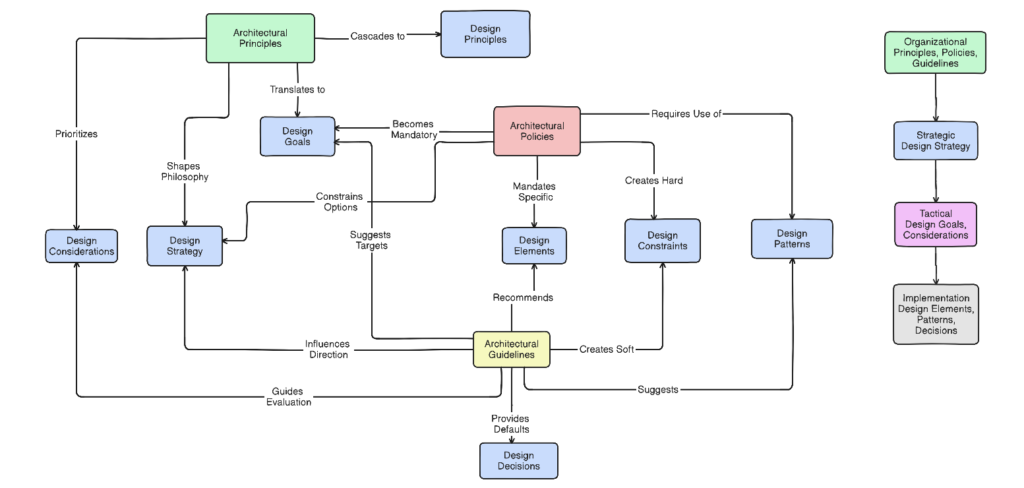
Architectural Principles, Policies and Guidelines and their impact on Design Hierarchy
In any organization before we start to work on any of the aforesaid concepts in specific projects, the over all Architectural Principles, Policies and Guidelines set at the organization level provide the boundaries in which the design concepts has to operate. Architectural principles, policies, and guidelines don’t restrict good design – they enable it by providing structure, consistency, and clear direction within which designers can focus on solving real problems rather than debating fundamental questions that have already been answered at the organizational level.
Architectural Principles are the Fundamental beliefs and values that guide all architectural decisions across the organization, Architectural Policies are the Mandatory rules and requirements that must be followed. Unlike principles (values), policies are enforceable rules with consequences for violation and Architectural Guidelines are the Recommended practices, patterns, and approaches that should be followed unless there’s a good reason not to. Unlike policies (mandatory), guidelines are recommendations with flexibility.
| Aspect | Architectural Principles | Architectural Policies | Architectural Guidelines |
|---|---|---|---|
| Definition | Fundamental beliefs and values that guide all architectural decisions | Mandatory rules and requirements that must be followed | Recommended practices and approaches that should be followed |
| Nature | Philosophical, aspirational | Prescriptive, enforceable | Advisory, flexible |
| Authority | “What we value” | “What you must do” | “What you should do” |
| Flexibility | Enduring, rarely change | Can change with approval, exceptions require justification | Frequently updated, deviation acceptable with reasoning |
| Enforcement | Cultural, through leadership | Automated checks, formal review gates, consequences for violation | Code reviews, recommendations, no formal consequences |
| Scope | Organization-wide, all systems | Organization or domain-wide | Team or technology-specific |
| Measurability | Qualitative, hard to measure | Quantitative, auditable | Mix of both |
| Examples | “Cloud-first”, “Design for failure”, “Data is an enterprise asset” | “All databases must be encrypted”, “APIs must have auth”, “99.9% uptime SLA” | “Prefer PostgreSQL”, “Use microservices”, “Code coverage >80%” |
| Violation Consequence | Loss of architectural coherence | Blocked deployment, formal exception needed | Warning, documentation required |
| Created By | CTO, VP Engineering | Architecture Review Board | Architecture Guild, Senior Engineers |
| Review Frequency | Annually | Quarterly | Continuously |
Following table shows the impact of Principles, Polices and Guidelines on the design concepts
| Design Concept | Impact of Principles | Impact of Policies | Impact of Guidelines | Example |
|---|---|---|---|---|
| Design Strategy | Shape overall approach and philosophy | Constrain valid strategic options | Influence technology and pattern choices | Principle: “Cloud-first” + Policy: “Must use AWS” + Guideline: “Prefer microservices” → Strategy: “Cloud-native microservices on AWS” |
| Design Goals | Translate values into measurable objectives | Become mandatory goals | Become recommended goals | Principle: “Design for failure” → Policy: “99.9% uptime” → Goal: “Max 43 min downtime/month” |
| Design Considerations | Influence prioritization of trade-offs | Remove certain options from consideration | Guide evaluation of alternatives | Principle: “Cost efficiency” prioritizes cost in cost-vs-performance trade-offs |
| Design Elements | Guide what types of components to use | Mandate specific components or technologies | Recommend preferred components | Policy: “Must use API Gateway” → Element: AWS API Gateway (mandatory) |
| Design Principles (Project) | Cascade to project-level principles | Must comply at project level | Inform project-level best practices | Org Principle: “Security built-in” → Project Principle: “Auth on all endpoints” |
| Design Patterns | Favor patterns aligned with values | Require specific patterns | Recommend proven patterns | Guideline: “Use CQRS for complex reads” → Pattern: CQRS selected |
| Design Decisions | Provide values-based rationale | Create non-negotiable constraints | Provide default choices | Decision: “Use PostgreSQL” traces to Guideline: “Prefer PostgreSQL” |
| Design Constraints | Create philosophical boundaries | Literally become constraints | Create soft constraints | Policy: “AWS only” becomes hard constraint; Guideline: “Prefer managed services” becomes soft constraint |
Following chart summarizes the impact
Conclusion
In any application development project it helps to understand the design concepts , it’s hierarchy and it’s relations to the Architectural Principles, Policies and Guidelines in effectively communicating with all stakeholders and navigating the execution.